
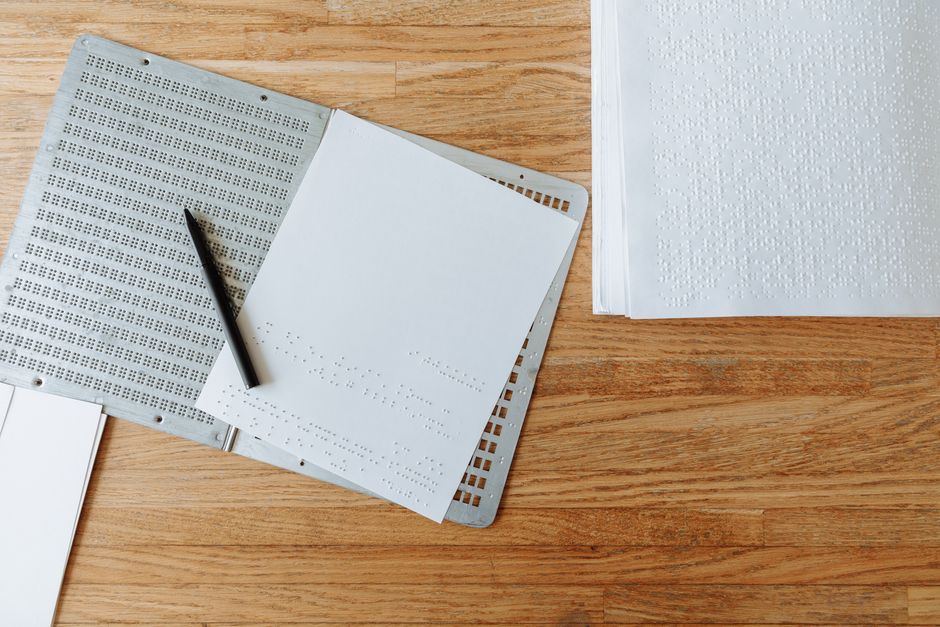
Writing in braille on paper comes down to one basic idea: you press a tool into the paper to raise dots you can feel with your fingertips. A slate and stylus is a small, hand-held guide you write with one dot at a time. A brailler is a keyboard-like machine that presses all six dots of a cell in a single stroke. Both produce the same result — raised braille dots — but they feel and work very differently.
This guide covers how each tool works, how to load paper, how to form the dots, and how to avoid the mistakes beginners make most often.
What Is Braille and How Does a Braille Cell Work?
Braille is a tactile writing system, not a language. It represents letters, numbers, punctuation, and symbols as patterns of raised dots that a reader feels with their fingertips.
The foundation is the braille cell. A cell is a rectangle tall enough for three dots and wide enough for two, giving six possible dot positions. These are numbered 1 through 6:
- Left column, top to bottom: dots 1, 2, 3
- Right column, top to bottom: dots 4, 5, 6
Different combinations of these six dots make different characters. The letter “a” is dot 1 alone. “b” is dots 1 and 2. “c” is dots 1 and 4. Because six dots give 63 usable combinations, braille needs a few extra rules to cover the full alphabet, numbers, and punctuation.
Numbers use the same dot patterns as the letters a through j, but they are preceded by a special number sign (dots 3, 4, 5, 6). Capital letters use a capital sign (dot 6) placed before the letter. These are not optional decorations — they change what the dots mean.
This is the part many beginners miss. Braille is not a one-to-one swap for print letters. It is its own system with its own logic, and the rules matter.
What Is the Difference Between a Slate and Stylus and a Brailler?
A slate and stylus is a manual, low-tech tool. A brailler is a mechanical device. Both write braille, but they suit different situations.
A slate is a flat guide, usually metal or plastic, with rows of rectangular openings the size of braille cells. You clip paper into it and press a stylus — a hand tool with a rounded tip — into each opening to form one dot at a time. To write a single cell, you press up to six separate dots.
A brailler, often called a Perkins-style brailler, is a box-like machine with six keys, a space bar, and a carriage that holds the paper. You press the keys that match the dots you want, all at once, and the machine embosses the whole cell in one motion. A separate key handles spaces, and the carriage moves automatically as you write.
Here is the key difference in practice:
- Slate and stylus: Portable, quiet, inexpensive, works anywhere. Slower to write. Best for short notes, labels, and quick jottings.
- Brailler: Faster, produces more even dots, easier for longer writing. Heavier, louder, and more expensive. Best for letters, homework, and longer documents.
Many braille users own both. The slate lives in a pocket or bag for quick notes. The brailler stays on a desk for real writing.
How Do You Load Paper Into a Slate or Brailler?
Loading paper correctly is where most beginners struggle, and it is worth getting right before you write a single dot.
Loading a slate and stylus
Open the slate so the two halves separate. Place a sheet of paper between them. Line up the top edge of the paper with the top edge of the slate so the paper sits square.
Close the slate so the paper is clamped between the two halves. The rectangular openings should now sit over the paper. Check that the paper is not shifted or wrinkled — a crooked sheet means crooked braille.
One important point: with a slate, you write from right to left and read from left to right. This is not a mistake. The stylus pushes dots up from the back of the paper, so the dots you feel on the front appear in mirror image to how you pressed them. Writing right to left makes the finished dots read correctly on the front side.
Loading a brailler
Turn the paper feed knobs on the sides of the machine to raise the carriage. Insert the top edge of the paper into the slot behind the roller. Turn the knobs to feed the paper down until it catches and rolls into place.
Most braillers have a paper-release lever. Keep it in the locked position while writing so the paper does not slip. Release it only when you want to adjust or remove the sheet.
Standard braille paper is heavier than ordinary printer paper. Light paper tears easily under the stylus or the brailler keys, and the dots do not hold their shape. Use proper braille paper or heavy cardstock when you can.




How To Write In Braille On Paper With A Slate Or Brailler
The writing motion itself is simple once the paper is loaded. The challenge is accuracy, and accuracy comes from practice and a steady hand.
Writing with a slate and stylus
Hold the stylus like a pen. Place its tip into the opening of the first cell, at the position for dot 1. Press firmly enough to raise a clear dot on the paper, but not so hard that you punch through.
Move to the position for the next dot in that cell and press again. Continue until you have formed every dot the character needs. Then move to the next cell to the right — remember, you are working right to left across the line.
When you reach the end of a row of cells, move down to the next row of openings and start again. The slate’s rows are spaced to match standard braille line spacing, so the layout stays even.
Writing with a brailler
Place your fingers on the six keys. Each key corresponds to one dot in the cell, arranged to match the dot positions: the left hand covers dots 1, 2, and 3, and the right hand covers dots 4, 5, and 6.
To write a character, press the keys for the dots you need at the same time, then release. The machine embosses the cell and the carriage advances automatically. Press the space bar to leave a blank cell between words.
Because all six dots form in one stroke, the brailler is much faster than the slate. It also produces more consistent dots, which matters for readers who rely on even, predictable spacing.
What Mistakes Do Beginners Make Most Often?
The most common beginner error with a slate is writing left to right instead of right to left. This produces backwards braille that cannot be read from the front. It happens because the mirror-image rule is not obvious until you see the result.
Other frequent problems:
- Pressing too hard. The stylus or keys punch through thin paper and tear it. Firm, even pressure is enough.
- Pressing too softly. Dots that are too shallow are hard to feel and fade with handling.
- Loading the paper crooked. A sheet that is not square to the slate or brailler produces lines that drift out of alignment.
- Using the wrong paper. Ordinary copy paper does not hold braille dots well and tears easily.
- Skipping the number or capital sign. Without these, the reader cannot tell whether a pattern means a letter, a number, or a capital.
One non-obvious point: the dots you press with a stylus feel backwards on the back of the paper, but they read correctly on the front. Beginners sometimes think they have made a mistake when they have not. Trust the right-to-left rule and check the front of the sheet.
Do You Need to Learn Braille Before You Can Write It?
Yes. Writing braille accurately requires knowing the braille code — which dot patterns represent which letters, numbers, and symbols. The tools only produce dots. The code tells you which dots to produce.
Braille is taught through instruction and practice, typically with a teacher trained in braille literacy. Learning the alphabet is the starting point, followed by numbers, punctuation, and the special signs for capitals and formatting.
There is also a distinction between uncontracted and contracted braille. Uncontracted braille, sometimes called Grade 1, spells out every letter. Contracted braille, sometimes called Grade 2, uses shortcuts and abbreviations to save space and speed up reading. Most published braille in the United States uses contracted braille, and it has its own set of rules to learn.
No clinical guidelines exist for how long it takes to learn braille, because it varies widely with instruction, practice, and the learner. What is clear is that the tools are the easy part. The code is the real work.
Which Tool Should You Start With?
Most beginners start with a slate and stylus because it is inexpensive and portable, then move to a brailler for longer writing. There is no single correct order.
If your goal is quick notes and labels, a slate and stylus covers it. If your goal is writing letters, schoolwork, or longer documents, a brailler saves significant time and produces more consistent results.
Either way, the sequence is the same: learn the code, load the paper correctly, form the dots with steady pressure, and practice until the motions become automatic. The tools are simple. The skill is in the practice.
Frequently Asked Questions
Do you write braille from right to left with a slate?
Yes. With a slate and stylus, you write from right to left so the raised dots read correctly from left to right on the front of the paper. A brailler does not require this because it embosses from the front.
Can you use regular printer paper for braille?
You can, but it does not work well. Ordinary paper is too thin to hold crisp dots and tears easily under a stylus or brailler keys. Heavier braille paper or cardstock holds the dots far better.
How many dots are in a braille cell?
A standard braille cell has six dot positions, arranged in two columns of three. These six positions give 63 usable combinations for letters, numbers, punctuation, and symbols.
Is a brailler faster than a slate and stylus?
Yes. A brailler embosses all six dots of a cell in one stroke, while a slate and stylus requires pressing each dot separately. The brailler is faster and produces more even dots, but it is heavier and more expensive.
