
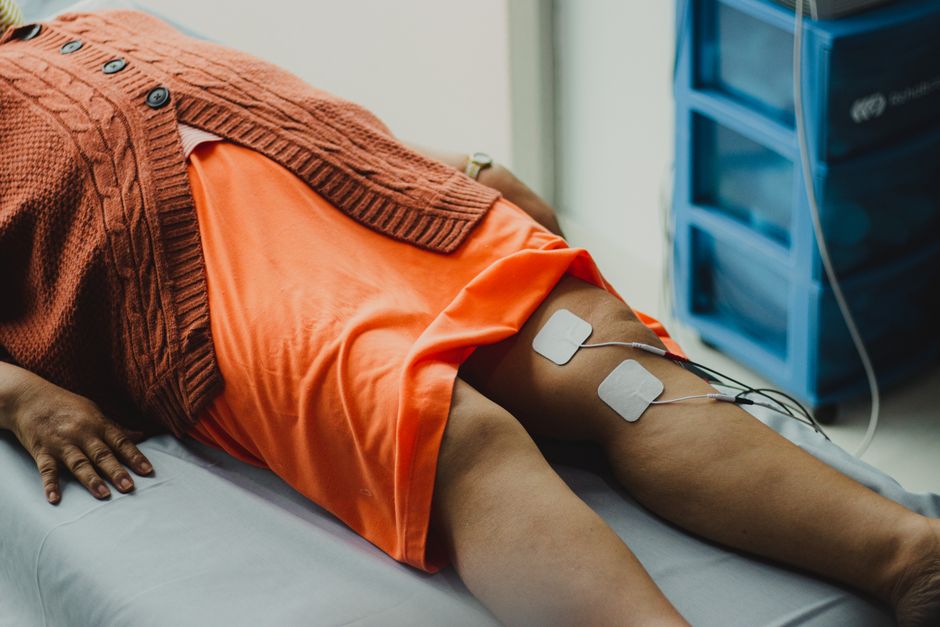
A TENS unit sends mild electrical pulses through the skin to help ease knee pain. You place two to four electrode pads around the painful area, start on a low setting, and slowly raise the intensity until you feel a gentle tingling that is strong but never painful. Sessions usually run about 15 to 30 minutes, and the device is generally safe for home use when you follow the manufacturer’s instructions. TENS is a comfort tool, not a cure — it does not repair damaged tissue or treat the cause of your knee pain.
What Is a TENS Unit and How Does It Work?
TENS stands for transcutaneous electrical nerve stimulation. “Transcutaneous” means through the skin — nothing pierces the surface. The device is a small battery-powered box with wires that connect to adhesive electrode pads you stick on your skin.
The pads deliver a low-level electrical current. This current can interfere with pain signals traveling to your brain. This is called the gate control theory — the idea that a steady stream of non-painful sensation can “close a gate” in the spinal cord and reduce how much pain signal gets through. Some research also suggests TENS may help the body release its own natural pain-relieving chemicals, though this is less firmly established in humans.
Here is the part people often miss: TENS does not treat the knee itself. It does not reduce inflammation, heal cartilage, or change the structure of the joint. It changes how you feel pain while you use it. That distinction matters when you decide what role it should play in your care.
How To Use A TENS Unit For Knee Pain
The steps are simple, but the details affect both comfort and safety. Work through them in order the first few times until they become routine.
1. Check the basics before you start
Read your device’s manual — settings and pad limits vary between models. Make sure the pads are still sticky and the batteries are charged. Worn pads that peel at the edges deliver current unevenly and can sting.
2. Place the electrode pads
Most units use two or four pads. Place them around the area that hurts, not directly over the kneecap bone if you can avoid it. A common approach is to put pads on either side of the joint or above and below the painful spot, so the current path crosses the area. Keep pads at least an inch apart and never let them touch each other.
Clean and dry the skin first. Do not place pads over broken skin, a rash, a cut, or a healing wound.
3. Choose a mode
Most devices offer a few modes. A continuous, steady tingling is the standard starting point. Some units offer burst or modulated patterns that cycle the intensity. There is no strong evidence that one mode works better than another for knee pain — comfort and your own response are the best guide.
4. Start low and adjust slowly
Turn the intensity up gradually. You want a clear tingling sensation that feels strong but comfortable. It should never be painful, and it should not make muscles twitch hard. If it stings sharply, turn it down and check that the pads are fully stuck to the skin.
5. Time your session
Typical sessions last about 15 to 30 minutes. Many people use TENS once or twice a day, or during activities that tend to aggravate the knee. Follow your device’s guidance on how long to run it and how long to rest between sessions.
6. Turn off and remove
Turn the unit off before removing pads. Peel them off gently and put them back on their protective backing so they last longer. Check the skin for redness — mild pinkness that fades is common, but irritation that persists is a reason to stop.
Where Should You Put the Electrodes on Your Knee?
There is no single correct pad placement. The goal is to surround the painful area so the current passes through it. Two common patterns work well for most people:
- Sandwich placement: One pad above the knee and one below, or one on each side of the joint, so the current crosses the painful zone.
- Surround placement: With four pads, position them roughly at the four corners around the sore spot.
Place the pads on the fleshy parts of the leg where they stick well. Avoid the bony front of the kneecap and the back of the knee where the skin is thin and sensitive. If one setup does not feel right, move the pads and try again — placement is easy to adjust.




Is TENS Effective for Knee Pain?
The evidence is mixed. This is the honest position, and it is worth understanding before you buy a device.
Some studies suggest TENS can reduce knee pain for some people, particularly in the short term and while the device is in use. Other studies — including reviews of the research — have found the benefit small or inconsistent, and hard to separate from placebo. Results vary widely from person to person.
What the research does not show is that TENS repairs the knee or slows conditions like osteoarthritis. Reviews of TENS for knee osteoarthritis have generally found limited or uncertain evidence of meaningful benefit. That does not mean it never helps — it means the proof is not strong, and responses differ.
Some clinicians recommend TENS as a low-risk add-on to other care, such as exercise and physical therapy. That is common practice rather than a firmly proven treatment. A fair way to think about it: TENS may take the edge off pain for some people, but it should not replace treatments that address the underlying problem.
Is a TENS Unit Safe? Who Should Avoid It?
For most healthy adults, TENS is considered low-risk when used correctly. Side effects are usually minor — skin irritation under the pads is the most common. Some people get mild redness or itching.
However, TENS is not safe for everyone. Do not use it, or check with a doctor first, in these situations:
- You have a pacemaker or other implanted electronic device. Electrical current can interfere with these devices. This is a serious contraindication.
- You are pregnant — do not place pads on the abdomen or lower back, and check with a clinician before using TENS at all.
- You have epilepsy or a seizure disorder.
- You have heart disease or an irregular heartbeat.
- You have poor circulation, nerve damage, or reduced skin sensation in the area.
- You have an implanted metal device such as a joint replacement, spinal stimulator, or insulin pump near the treatment area.
- You have open wounds, infections, or skin conditions where the pads would go.
Do not place pads on the front of the neck, over the head, across the chest, or near the eyes. Do not use TENS while driving or operating machinery. If you are unsure whether TENS is appropriate for you, ask a clinician — this is not a decision to make from a product box alone.
How Does TENS Compare With Other Knee Pain Options?
TENS is one tool among several. It helps some people feel more comfortable, but it does not address the cause of knee pain the way other approaches can. Here is how it fits alongside common options:
| Approach | What it does | Evidence strength |
|---|---|---|
| TENS | May reduce pain sensation while in use | Mixed; benefit often small or uncertain |
| Exercise and physical therapy | Strengthens muscles, improves function and stability | Strong for many types of knee pain |
| Weight management | Reduces load on the knee joint | Strong for knee osteoarthritis |
| Heat or cold packs | May ease stiffness or swelling short term | Some evidence for short-term comfort |
| Pain medication | Reduces pain signals | Established, but with side effects to weigh |
This table is a general guide, not a ranking. The best combination depends on the cause of your knee pain — which is why a proper diagnosis matters. Knee pain can come from osteoarthritis, injury, tendon problems, bursitis, or referred pain from the hip or back. TENS treats none of these directly.
Common Mistakes and Practical Tips
Most problems with TENS come from setup, not the device itself. A few habits make a real difference.
- Turning it up too fast. Ramp the intensity slowly. A sudden jump can sting and make you avoid using it again.
- Using worn pads. Pads lose stickiness over time. Replace them when they stop adhering well.
- Using it as the only treatment. TENS may ease pain, but it will not strengthen the knee or address the cause. Pair it with care that does.
- Ignoring new or worsening pain. If knee pain is severe, comes with swelling, locking, giving way, or fever, see a clinician rather than relying on TENS.
- Leaving it on too long. Follow the device’s time limits and give your skin a break between sessions.
One useful point: TENS works best when it lets you move more comfortably. If it helps you do your exercises or daily activities with less pain, that is a meaningful benefit — even if the device itself is not healing anything. Movement is often the part that helps the knee most.
Frequently Asked Questions
How long should you use a TENS unit for knee pain?
Most sessions last about 15 to 30 minutes, once or twice a day. Follow your device’s instructions and rest your skin between sessions.
Can you use a TENS unit on your knee every day?
Many people use TENS daily without problems, but check with a clinician if you have any health conditions on the avoid list. Stop if you notice skin irritation that does not settle.
Does a TENS unit actually help knee pain?
Some people feel less pain while using it, but the research evidence is mixed and benefits are often small or uncertain. It does not repair the knee or treat the cause of pain.
Where should you not put TENS pads?
Avoid the front of the neck, the head, across the chest, over the eyes, and any broken or irritated skin. Never place pads over an implanted electronic device such as a pacemaker.
