
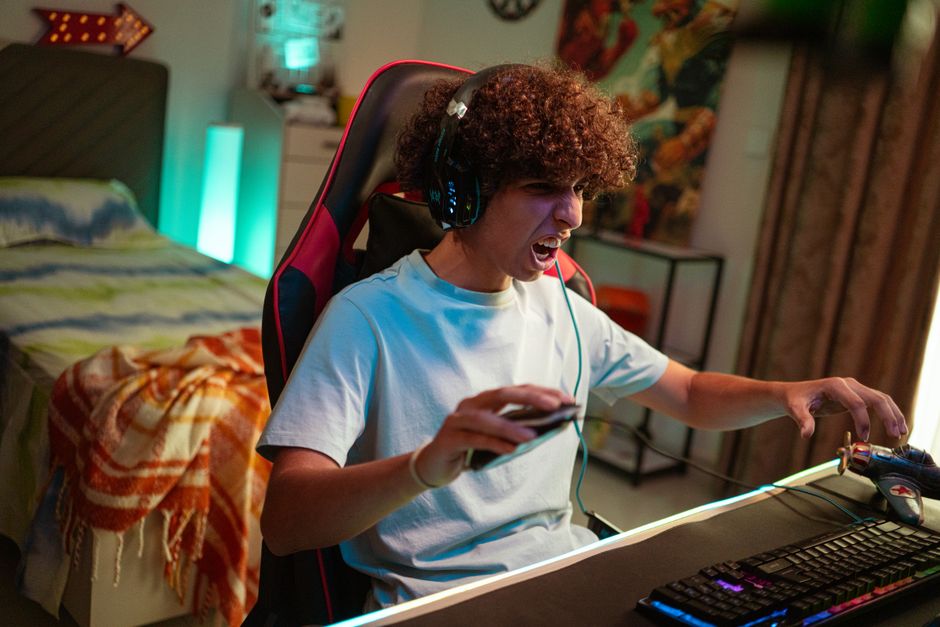
Most people sit in a gaming chair the same way they sit on a couch — slumped, tilted, or with their head craned toward the screen. That position cancels out the chair’s design. To get better posture in a gaming chair, you need to adjust the chair to your body first, then position yourself with your feet flat, your back against the seat back, and your screen at eye level. The chair supports you only when you set it up correctly and sit in it deliberately.
Why Gaming Chairs Cause So Much Confusion
Gaming chairs look like race car seats. They have high side bolsters, a tall backrest, and a headrest pillow. People assume that sitting in one automatically fixes posture. That is not how it works.
A gaming chair is a tool. Like any tool, it works only when used correctly. The aggressive lumbar support and high backrest only help if your body is positioned against them. If you slouch forward, the lumbar pillow pushes into your mid-back instead of your lower back, which creates pressure and discomfort.
The chair also encourages a specific sitting style. The bucket seat design keeps your hips in one place, which is helpful, but it does nothing for your upper body if you lean forward. You still have to hold your head and shoulders in a neutral position on your own.
How To Sit In A Gaming Chair For Better Posture — Step By Step
Start with the chair adjustments. Most gaming chairs have four: seat height, armrest height, backrest angle, and lumbar support position. Set each one before you sit down.
Adjust the seat height so your feet rest flat on the floor. Your knees should be at roughly a 90-degree angle, with your thighs parallel to the ground. If your feet dangle, the chair is too high. If your knees rise above your hips, the chair is too low.
Set the backrest to a slight reclined angle — about 100 to 110 degrees from the seat base. Sitting perfectly upright at 90 degrees actually increases pressure on the spinal discs. A slight recline reduces that pressure while still keeping your spine in its natural curve.
Position the lumbar pillow so it fills the curve of your lower back. The pillow should sit at the small of your back, not higher up. If your chair has built-in lumbar support instead of a pillow, adjust it the same way.
Now sit down and do this sequence:
- Scoot your hips all the way back so your buttocks touch the backrest.
- Let your upper back rest against the backrest — do not hover forward.
- Keep both feet flat on the floor. Do not tuck one foot under your chair.
- Relax your shoulders. They should not be raised toward your ears.
- Position your screen so the top of the monitor is at or slightly below eye level.
- Keep your forearms roughly parallel to the floor when your hands are on the keyboard or controller.
Your ears should stack over your shoulders, and your shoulders should stack over your hips. That is the neutral spine position. It is not a rigid military posture. It is a relaxed, aligned position that your body can hold comfortably.
What Your Chair Should Actually Feel Like
Many people think good posture means feeling tight or strained. It should not. If you sit correctly in a gaming chair, you should feel supported, not squeezed.
Your lower back should feel the lumbar support pressing gently into the curve of your spine. Your shoulder blades should rest against the backrest without your shoulders being pushed forward. Your thighs should feel supported along their full length without pressure behind the knees.
If you feel pressure points, the chair is not adjusted for your body. The seat pan might be too short or too long for your legs. The armrests might be too high or too low. The lumbar pillow might be positioned wrong.
Here is what each of those problems feels like:
- Pressure behind the knees means the seat is too long for your legs.
- Shoulders pushed forward means the backrest angle is too upright.
- Lower back pain after an hour means the lumbar support is not positioned in the curve of your spine.
- Wrists bent upward while typing means the armrests are too high.
Adjust until those pressure points disappear. A properly adjusted gaming chair should feel like it disappears under you — you should not be thinking about it.





The Headrest And Neck Pillow — Use It Or Lose It
The headrest pillow is the most misunderstood part of a gaming chair. Many people skip it entirely. Others lean their head back against it constantly. Both are wrong.
The headrest is not for resting your head while you play. It is a reference point. It tells you when your head drifts forward. If you sit with your head against the pillow all the time, you end up pushing your chin toward your chest, which strains the neck.
The correct use is to keep your head near the pillow but not pressed against it. Your head should be close enough that you can feel it when you start to lean forward. That subtle touch acts as a reminder to reset your position.
If the pillow pushes your head too far forward, remove it. Some chairs place the headrest at a height that does not match your body. A headrest that forces your neck into an unnatural angle is worse than no headrest at all.
How Long Can You Actually Sit In A Gaming Chair?
No chair — gaming or otherwise — is designed for you to sit in it for eight hours straight. Even with perfect posture, staying in one position for hours creates problems.
Research consistently shows that prolonged sitting, regardless of posture, is linked to increased risk of musculoskeletal discomfort and metabolic issues. The spine is designed to move. Intervertebral discs get their nutrition through movement, not through staying still.
The practical answer is to change position regularly. Stand up every 30 to 60 minutes, even if just for a minute. Stretch your legs. Walk to the kitchen. Let your spine move through its full range of motion.
Some experts recommend the 20-20-20 rule for eye strain — every 20 minutes, look at something 20 feet away for 20 seconds. That rule applies to posture too. Every 20 minutes, reset your position. Check that your feet are flat, your back is against the backrest, and your head is not drifting forward.
No amount of chair adjustment replaces regular movement. A gaming chair can make sitting more comfortable and reduce strain, but it cannot make sitting healthy. Movement is the actual solution.
Common Posture Mistakes People Make With Gaming Chairs
Several mistakes come up over and over. Recognizing them is the first step to fixing them.
Sitting on the edge of the seat. Some people perch on the front edge of the chair, especially during intense gaming moments. This removes all back support and puts the entire load on your hip flexors and lower back muscles. Scoot back.
Crossing one leg under the body. This tilts the pelvis and puts uneven pressure on the spine. It might feel comfortable for a few minutes, but it creates asymmetry that leads to pain. Keep both feet on the floor.
Leaning to one side. Many people rest one elbow on an armrest and lean their upper body to that side. This creates a lateral curve in the spine. The armrests should be used for resting your arms, not for leaning your whole body weight.
Setting the armrests unevenly. The left and right armrests should be at the same height. If one is higher, your shoulders become uneven. Adjust both to the same level.
Craning the neck toward the screen. This is the most common mistake of all. The head weighs about 10 to 12 pounds in a neutral position. For every inch the head moves forward, the load on the neck muscles roughly doubles. Bring the screen closer or raise it so you do not have to lean in.
Does A More Expensive Gaming Chair Mean Better Posture?
Price does not determine whether a chair supports good posture. A $200 chair adjusted correctly will support better posture than a $600 chair adjusted poorly.
What you pay for in a more expensive chair is usually build quality, materials, and adjustability options. More adjustment points mean you can tailor the chair more precisely to your body. But only if you actually use those adjustments.
If you are considering a new chair, look for these features:
- Adjustable lumbar support that moves vertically
- Armrests that adjust in multiple directions
- A seat pan deep enough for your thighs
- A backrest that reaches your shoulder blades
The chair itself is only part of the equation. Your desk height, monitor position, and keyboard placement matter just as much. A perfect chair cannot compensate for a desk that is too high or a monitor that is too low.
When Posture Is Not The Problem
Sometimes back or neck pain is not about posture. If you have adjusted your chair, corrected your sitting position, and still have persistent pain, see a healthcare professional.
Pain that radiates down your leg, numbness or tingling in your hands, or pain that wakes you up at night are not normal posture issues. These can indicate underlying conditions that need proper evaluation.
A physical therapist can assess your specific movement patterns and provide targeted exercises. No chair adjustment replaces individualized medical advice.
Frequently Asked Questions
Should I use the lumbar pillow on my gaming chair?
Yes, if it is positioned in the curve of your lower back. If the pillow sits too high or pushes your spine forward, remove it.
Is it okay to recline in a gaming chair?
A slight recline of about 100 to 110 degrees is actually better for your spine than sitting perfectly upright. Reclining too far, however, reduces support and can strain your neck.
How often should I stand up while gaming?
Stand up and move every 30 to 60 minutes. Even one minute of movement helps reset your posture and keeps your spine healthy.
Why does my back hurt after sitting in my gaming chair?
Most likely the chair is not adjusted to your body or you are not sitting back against the backrest. Check your seat height, lumbar position, and whether your feet are flat on the floor.
